new

Try the new
Express Self Service

Book a car for the exact day and time you need and pick it up yourself – no need to meet our driver.
Minimal paperwork. Quick pick-up and return.

Express Customer Zone login screen
Confirmation of a completed online check-in in the Customer Zone
9:41
Thursday, 26 September
20:00
Express Car Rental now
Your car is waiting for you!
Go to Your reservations – Express Self Service and start your rental.
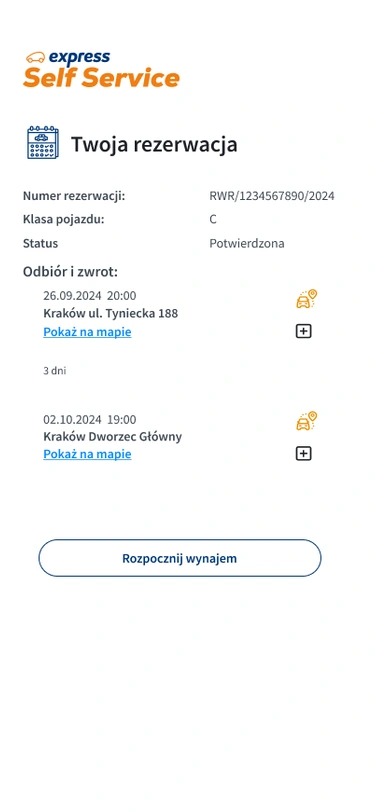
“Your reservation” screen in the Customer Zone with the vehicle pick-up button
Unlocking the car — scanning the QR code on the car window
Returning the car — return point map and end-of-rental confirmation

How it works

  • 1
  • 2
  • 3
  • 4
  • 5
  • 6
  • 7

Log in

Go to express.pl or open the app and log in. No account yet? It only takes a minute to create one.

Step 1

Choose Express Self Service

When booking, choose a pick-up and return point marked Express Self Service.

Step 2

Complete online check-in

Save your pick-up code – you may need it if Express Self Service is temporarily unavailable.

Step 3

Wait for the notification

We’ll send you a text message as soon as your car is ready.

Step 4

Open the Express Self Service tab

Once you’re there, log in on your phone, go to Your reservations and tap the Express Self Service banner. This is where you pick up and return the car.

Step 5

Pick up the car

Find the car (you’ll see its location in the Customer Zone), accept the pick-up report and scan the QR code on the window to unlock it. You then have 15 minutes to report any issues.

Step 6

Drive and return the car

Use the key to lock the car during your rental. When you’re done, drive to the return point and end the rental in the Express Self Service tab.

Step 7
What’s in it for you

Express Self Service is car rental on your terms — faster, easier and cheaper.

Get in and go

Your car is waiting at the agreed place and time, ready to go. No queues, no waiting for our driver.

Convenience for less

The same comfort for less. Save money without compromising on anything.

Everything under control

Contract, check-in, damage reports – all handled online, at your own pace. No surprises.

Find a pick-up and return point

Enter a city or address to find your nearest Express Self Service point. We’re adding new locations all the time.

Frequently asked questions

Everything you need to know about Express Self Service.

The whole process — from booking to return — looks like this:

  1. Log in to your account on express.pl (or in the app). No account yet? You can create one in less than a minute. The service is available to logged-in users only.
  2. When making your reservation, choose a pick-up and return point marked as Express Self Service.
  3. Complete the online check-in and keep the pick-up code you receive. You may need it if the handover has to take place with the help of a driver.
  4. When the car has been delivered to the pick-up point specified in your reservation, you will receive a notification by email and to the phone number you provided.
  5. Before you set off to pick up the car, take your phone and log in on express.pl to the same account you used to make the reservation. Tap “Your reservations” and then “Express Self Service”. This is where the car will be automatically handed over and returned.
  6. Go to the indicated car. Reservation details and the vehicle location are available in the Customer Zone, under “Your reservations” and then “Express Self Service”.
  7. Accept the pick-up report and scan the QR code on the side or front window of the car to unlock it and start the rental. Once inside the car, you have 15 minutes to report any additional remarks using the “Report remarks” option.
  8. During the rental, lock the car with the key located in the centre console or in the glove compartment. The Express Self Service tab in the Customer Zone is used only to start and end the rental.
  9. To end the rental, drive to the return point selected in your reservation and end the rental following the instructions in the Express Self Service tab in the Customer Zone.
Was this answer helpful?

It is a way of renting and returning a car automatically, so you can simply get in and go. Everything is based on online check-in and unlocking the car with a QR code.

Was this answer helpful?

To use the service, you need to:

  1. create an account on express.pl,
  2. make a reservation while logged in to your account, choosing pick-up and return with Express Self Service,
  3. successfully complete the online check-in,
  4. take your phone and log in on express.pl to the same account you used to make the reservation, then tap “Your reservations” and then “Express Self Service”. This is where the car will be automatically handed over and returned.
Was this answer helpful?

When you are at the car, scan the QR code on the side or front window — the car will unlock automatically.

Was this answer helpful?

After removing all your personal belongings from the car, end the rental in the Customer Zone, under “Your reservations” and then “Express Self Service”. Before you do, make sure that:

  • the car is correctly parked in its designated space,
  • the engine is switched off,
  • the keys or key card are in their designated place,
  • the parking brake is applied,
  • the lights are set to “auto” or switched off,
  • all doors and windows are closed.

After locking the car in the Express Self Service tab, pull the door handle to make sure the car is locked.

Was this answer helpful?

Once the rental has ended and the car has been locked, it cannot be unlocked again. To collect any items left behind, you will need to wait for a member of our staff.

Was this answer helpful?

Online check-in is a process that lets you complete all the formalities related to renting a car from Express Car Rental before you pick it up. This means starting your rental takes only a moment.

Was this answer helpful?

If you don’t complete the online check-in, the car will be handed over in the traditional way, by our driver. You will find information about the change of handover method in the Customer Zone after logging in to your express.pl account. Please note that this may involve an additional handover fee, which you can pay in the Customer Zone, via the payment link sent by email, or to the driver at handover.

Was this answer helpful?

If you notice it when picking up the car, you can report it on the pick-up report screen or within 15 minutes of unlocking the car — in the Customer Zone, under “Your reservations” → “Your rental” → “Express Self Service”.

If the damage occurred during the rental, report it to our hotline immediately.

Was this answer helpful?

All documents will be sent to you by email:

  • right after making your reservation, you will receive a confirmation and a sample contract,
  • the signed contract, the vehicle handover report, the terms and conditions and other documents will be sent right after you pick up the car,
  • we will send the return report after the car has been inspected by our staff — within 24 hours of the end of the rental at the latest.
Was this answer helpful?

Express Self Service lets you use our car rental automatically, without having to deal with a member of staff, and at a lower price than a traditional handover. It combines the convenience of car sharing with the predictability of a car rental. Minimum paperwork, fast pick-up and return.

Was this answer helpful?

Express Self Service is currently available for selected vehicle classes, because not all of our cars are equipped with the system that enables automatic unlocking. We are gradually equipping more cars and expanding the availability of the service. We will keep you informed of all changes.

Was this answer helpful?

Express Self Service is currently available at selected pick-up points. We are steadily expanding the service and will keep you informed of all changes.

Was this answer helpful?

Yes. Before starting the rental, check the condition of the car and make sure there is no damage that is not listed in the documentation. If you notice any new damage, report it in the pick-up report — in the Customer Zone, under “Express Self Service” → “Your rental”.

Was this answer helpful?

When the car has been delivered, we will let you know by SMS. If you want to check whether the car is already waiting, go to the Customer Zone: “Your reservations” → “Your reservation” → “Express Self Service”.

If you want to change the pick-up time to an earlier one, you can do so in the Customer Zone no later than 12 hours before the scheduled handover time. After that, call our hotline to check whether this option is still available.

Was this answer helpful?

Make sure you are at the right car and have an active internet connection. If the problem persists, contact our hotline — have your reservation number and the online check-in code you received by email ready.

Was this answer helpful?

Yes. Every car handed over with Express Self Service is prepared by us in exactly the same way as for a traditional handover with a driver.

Was this answer helpful?

You have 3 hours to pick up the reserved car. If you don’t start the rental by then, the reservation will be cancelled automatically and you will be charged a reservation fee in accordance with the Express Car Rental terms and conditions.

If you know you won’t make it to the pick-up point on time, you can make changes in the Customer Zone no later than 12 hours before the scheduled handover time. If you need to do so later, call our hotline to report the delay.

Was this answer helpful?

Ready to get in and go?

Book with Express Self Service and pick up your car yourself – quick, convenient and for less.

Book a car →